Плъгин за WooCommerce
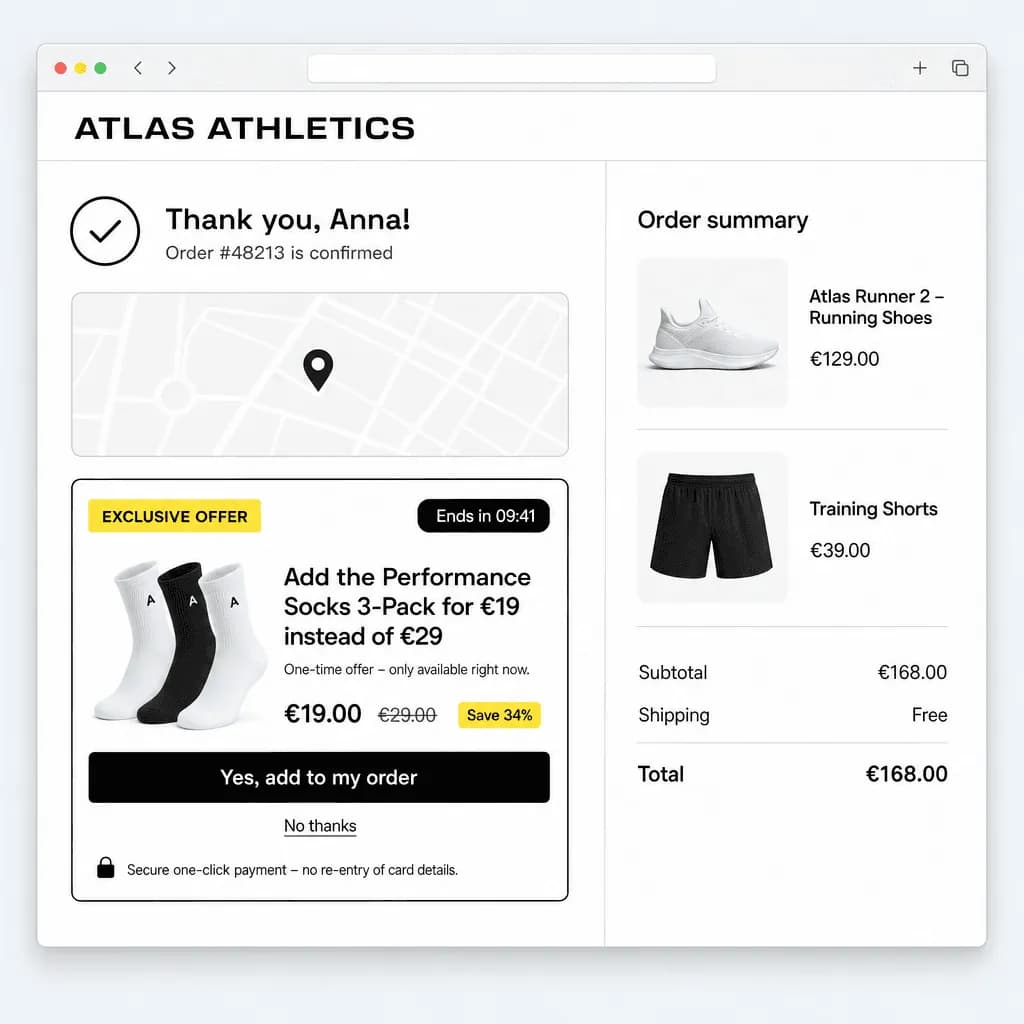
Upsell с един клик за WooCommerce – на страницата за благодарност, която вече имате
Работи с официалния WooCommerce Stripe Gateway и с WooCommerce PayPal Payments. Без промени по темата, без намеса в checkout-а, без клиентски данни извън магазина ви. Без абонамент, без планове – 3 % от upsell оборота, който генерираме.
- Без абонамент – 3 % от upsell оборота, който генерираме
- Без месечна такса – плащате само върху upsell оборот
- Настройка за 10 минути
- В съответствие с GDPR, хостинг в ЕС
Изисквания
WordPress 6.2+, WooCommerce 8+, PHP 8.1+, HTTPS.
Поддържани платежни плъгини
WooCommerce Stripe Gateway (карти, портфейли) и WooCommerce PayPal Payments ≥ 4.1 (vaulting).
Фактуриране
Без абонамент. 3 % от upsell оборота, който MrUpsell генерира, фактурирани седмично със задна дата към картата във вашия MrUpsell dashboard. Няма продажби – няма плащане.
Как работи
Три стъпки до втората ви продажба
От инсталирането до първата активна оферта за под 10 минути.
- 01
Изтеглете и активирайте
Изтеглете ZIP файла, качете го в Plugins → Add New и натиснете „Connect to MrUpsell“ в WooCommerce → MrUpsell. Влезте или създайте акаунт и сте свързани – без лицензни ключове. Запазете карта или PayPal в dashboard-а и офертите ви стават активни.
- 02
Създайте правило за оферта
Изберете задействащи продукти или категории, upsell продукта (обикновен или вариация), отстъпка, обратно броене и до три funnel стъпки.
- 03
Продавайте на страницата за благодарност
Офертата се появява на стандартната страница „Поръчката е получена“. Един клик създава платена дъщерна поръчка през Stripe или PayPal – без нищо за повторно въвеждане.
Функции
Създаден за WooCommerce магазини
Нативен плъгин с rule engine, funnel стъпки, обратно броене, опции за дизайн и статистика – плюс автоматични актуализации от MrUpsell hub-а.
Истинска покупка с един клик
Таксува upsell-а чрез платежната сесия на първоначалната поръчка – със Stripe или PayPal. Без checkout, без повторно въвеждане на карта.
Funnel-и: upsell, upsell, downsell
До три стъпки на правило. Покажете следваща оферта след приемане или по-евтина алтернатива след отказ.
Обратно броене, което продава
Таймерът стартира при първото посещение на страницата за благодарност и се следи от сървъра – така спешността е реална и честна.
Пълен контрол върху дизайна
Цветове, заобляне, оформление, позиция, изображение или видео – пасва на темата ви от самото начало, а при желание скрива нашия брандинг.
Статистика, която има значение
Импресии, дял на приетите оферти, оборот по правило и по платежен метод – в плъгина и за всички магазини в MrUpsell dashboard-а.
Готов за GDPR, хостинг в ЕС
Магазина ви напускат единствено обобщени числа. Към MrUpsell не се изпращат клиентски данни. Сумите винаги се изчисляват от сървъра.
Цени
Без абонамент. Без планове.
Плащате само когато ви носим пари: 3 % от upsell оборота, който MrUpsell генерира. Без месечна такса, без нива, без такса за настройка.
Преместете плъзгача до сумата, която MrUpsell може да добави към магазина ви – оборот, който иначе не бихте реализирали.
За вас остават
1940,00 €
97 % от upsell оборота
Такса за MrUpsell
60,00 €
3 % · фактурира се седмично със задна дата
Първите 30 дни без такса · 0 € месечно · 0 € за настройка · плащате само върху upsell оборот
Какво е включено: всичко.
- Upsell с един клик през Stripe
- Upsell с един клик през PayPal
- Статистика по правило и платежен метод
- Funnel-и с до 3 стъпки (upsell → upsell/downsell)
- Пълен контрол върху дизайна
- Без брандинг на MrUpsell
- Неограничен брой магазини в един workspace
- Приоритетна поддръжка
- Неограничени правила за оферти
- Неограничен upsell оборот
- Обратно броене, тригери, таргетиране
- Автоматични актуализации на плъгина
- Общ dashboard за всички платформи
Таксите се изчисляват върху приетите upsell поръчки минус възстановените суми и се фактурират седмично със задна дата – през запазената карта за WooCommerce, през Shopify Billing за Shopify. Всички цени са без ДДС.
ЧЗВ
Често задавани въпроси
Как upsell-ът може да бъде таксуван с един клик?
При първоначалния checkout искаме от платежния доставчик да запази платежния метод използваем за последващо таксуване (Stripe: setup_future_usage, PayPal: vaulting, Shopify: post-purchase авторизацията). Когато клиентът приеме, магазинът таксува upsell-а от сървъра. Ако банката изисква 3-D Secure, потвърждението става в браузъра.
Кои методи на плащане се поддържат?
WooCommerce: Stripe (карти, Apple Pay, Google Pay през официалния WooCommerce Stripe Gateway) и PayPal (WooCommerce PayPal Payments). Shopify: всичко, което Shopify допуска за post-purchase оферти, основно Shopify Payments. При други методи офертата просто не се показва.
Вижда ли MrUpsell данните на клиентите ми?
Не. Магазинът ви изпраща към MrUpsell hub-а само обобщени числа (импресии, приети оферти, upsell оборот, възстановени суми) за dashboard-а и за фактурата за дела от оборота. Имена, имейли, адреси и данни за карти никога не напускат магазина ви.
Има ли безплатен план?
Планове изобщо няма – безплатно е, докато не се продаде първият ви upsell; след това 3 % от upsell оборота, който MrUpsell генерира. Без месечна такса, без нива, без заключени функции.
Кога се начислява таксата?
Седмично, със задна дата. Всеки понеделник фактурираме 3 % от нетния upsell оборот за предходната седмица (приети upsell поръчки минус възстановени суми). Търговците с WooCommerce плащат със запазената карта в MrUpsell dashboard-а; търговците с Shopify – през Shopify Billing, като такса за използване с таван върху фактурата им от Shopify.
Мога ли да го използвам на staging сайт?
Да. Свържете колкото магазини искате и прекъснете връзката със сайт от dashboard-а по всяко време. Тестови поръчки, които са възстановени, не се броят към таксата.
Как да се откажа?
Деактивирайте плъгина или деинсталирайте приложението – няма договор за прекратяване. Таксите, вече натрупани през текущата седмица, се фактурират следващия понеделник; след това не плащате нищо.
Добавете MrUpsell към своя WooCommerce магазин
Акаунт и изтегляне на плъгина за една минута. Без абонамент – 3 % от това, което продадем за вас.