Aplikace pro Shopify
Upselly na jedno kliknutí pro Shopify – nativní post-purchase, žádné hacky v checkoutu
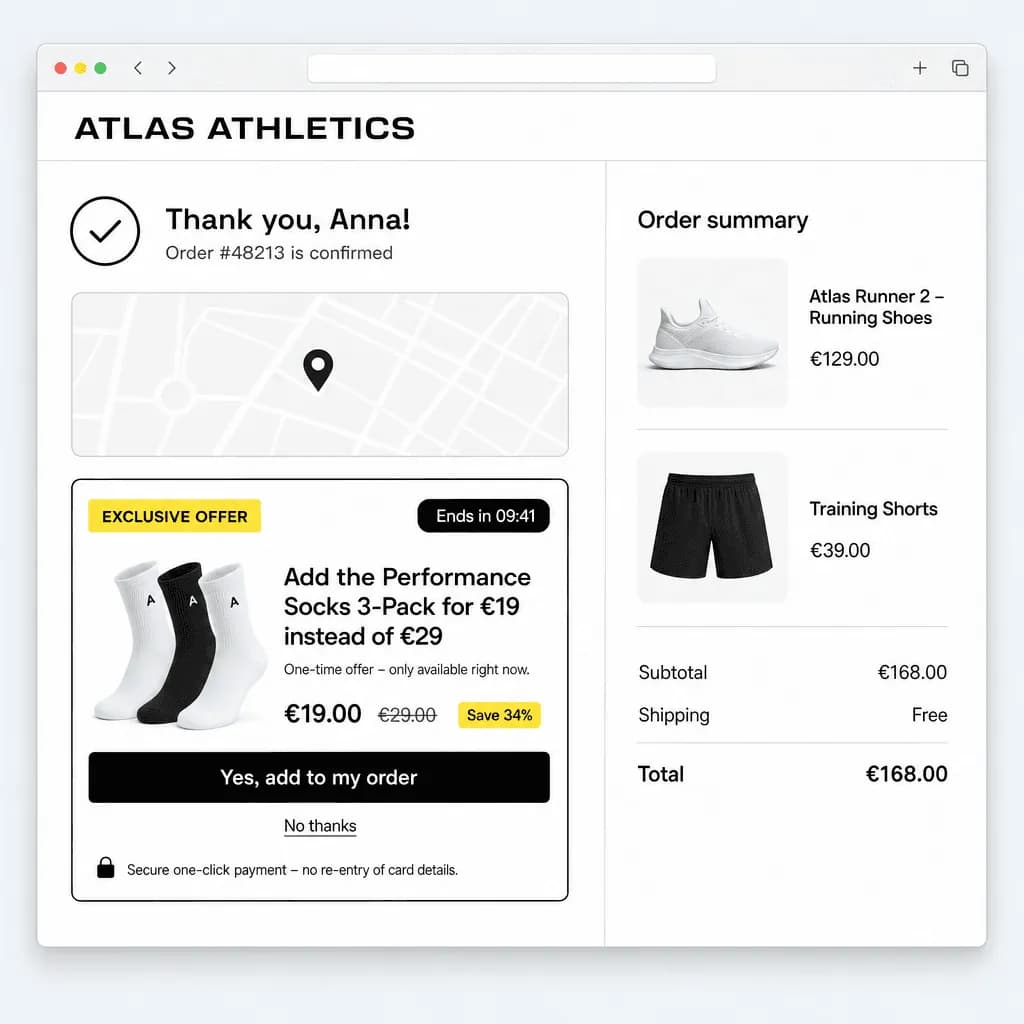
Postaveno na oficiálním post-purchase rozšíření Shopify. Nabídky se vykreslují v checkoutu Shopify, platí se stávající autorizací zákazníka a plně odpovídají pravidlům App Storu. Žádné předplatné, žádné tarify – 3 % z upsell obratu, který vygenerujeme.
- Žádné předplatné – 3 % z upsell obratu, který vygenerujeme
- Žádný měsíční poplatek – platíte jen z upsell obratu
- Nastavení za 10 minut
- V souladu s GDPR, hostováno v EU
Požadavky
Shopify checkout s podporou post-purchase (doporučujeme Shopify Payments). Jedna post-purchase aplikace na obchod.
Platba
Shopify u každé objednávky rozhoduje, zda je nabídka možná, a upsell strhává samo – některé peněženky a splátkové metody Shopify vylučuje.
Fakturace
Žádné předplatné. 3 % z upsell obratu jako poplatek za využití Shopify s horním limitem (limit 5 000 US$/měsíc, kdykoli ho můžete zvýšit) na vaší faktuře od Shopify.
Jak to funguje
Tři kroky k druhému prodeji
Od instalace k první aktivní nabídce za méně než 10 minut.
- 01
Nainstalujte z App Storu
Schvalte aplikaci a její poplatek za využití a poté v Nastavení → Pokladna → Post-purchase stránka vyberte MrUpsell. Podíl z obratu se účtuje přes Shopify.
- 02
Vytvořte pravidlo nabídky
Vyberte spouštěcí produkty nebo kolekce, upsell variantu a slevu. Pro zákazníky, kteří odmítnou, přidejte downsell krok.
- 03
Nabídka mezi platbou a děkovací stránkou
Shopify vykreslí nabídku v checkoutu. Když ji zákazník přijme, Shopify strhne platbu přes stávající autorizaci – bez opětovného zadávání.
Funkce
Vytvořeno pro obchodníky na Shopify
Engine pravidel, funnely, možnosti designu a statistiky přímo ve vestavěné administraci – se stejným modelem nabídek jako náš WooCommerce plugin.
Skutečný nákup na jedno kliknutí
Shopify strhne upsell přes autorizaci původní objednávky. Žádný checkout, žádné nové zadávání karty.
Funnely: upsell, upsell, downsell
Až tři kroky na pravidlo. Po přijetí zobrazte navazující nabídku, po odmítnutí levnější alternativu.
Odpočet, který konvertuje
Časovač se spustí při první návštěvě děkovací stránky a hlídá ho server, takže naléhavost je skutečná a férová.
Plná kontrola nad designem
Barvy, zaoblení, rozvržení, umístění, obrázek nebo video – ladí s vaší šablonou hned po instalaci a náš branding můžete skrýt.
Statistiky, na kterých záleží
Zobrazení, míra přijetí, obrat podle pravidla i platební brány – v pluginu a napříč obchody v dashboardu MrUpsell.
Připraveno na GDPR, hostováno v EU
Váš obchod opouštějí výhradně souhrnná čísla. Do MrUpsell se neodesílají žádná data zákazníků. Částky se vždy počítají na serveru.
Ceník
Žádné předplatné. Žádné tarify.
Platíte jen tehdy, když vám vyděláme: 3 % z upsell obratu, který MrUpsell vygeneruje. Žádný měsíční poplatek, žádné úrovně, žádný zřizovací poplatek.
Posuňte jezdec na částku, kterou by MrUpsell mohl vašemu obchodu přinést – jde o obrat, který byste jinak neměli.
Vám zůstane
1 940,00 €
97 % z upsell obratu
Poplatek MrUpsell
60,00 €
3 % · účtováno týdně zpětně
Prvních 30 dní bez poplatků · 0 € měsíčně · 0 € za zřízení · platíte jen z upsell obratu
Co je v ceně: všechno.
- Upselly na jedno kliknutí přes Stripe
- Upselly na jedno kliknutí přes PayPal
- Statistiky podle pravidla a platební brány
- Funnely až o 3 krocích (upsell → upsell/downsell)
- Plná kontrola nad designem
- Bez brandingu MrUpsell
- Neomezený počet obchodů na workspace
- Prioritní podpora
- Neomezený počet pravidel nabídek
- Neomezený upsell obrat
- Odpočet, spouštěče, cílení
- Automatické aktualizace pluginu
- Dashboard napříč platformami
Poplatky se počítají z přijatých upsell objednávek po odečtení vrácených plateb a účtují se týdně zpětně – u WooCommerce z uložené karty, u Shopify přes Shopify billing. Všechny ceny jsou uvedeny bez DPH.
FAQ
Časté dotazy
Jak je možné zaúčtovat upsell jedním kliknutím?
Při původním checkoutu požádáme platební bránu, aby platební metodu ponechala použitelnou pro navazující platbu (Stripe: setup_future_usage, PayPal: vaulting, Shopify: post-purchase autorizace). Když zákazník nabídku přijme, obchod strhne upsell na straně serveru. Pokud banka vyžaduje 3-D Secure, proběhne ověření přímo v prohlížeči.
Které platební metody jsou podporovány?
WooCommerce: Stripe (karty, Apple Pay, Google Pay přes oficiální WooCommerce Stripe Gateway) a PayPal (WooCommerce PayPal Payments). Shopify: vše, co Shopify povoluje pro post-purchase nabídky, především Shopify Payments. U ostatních metod se nabídka jednoduše nezobrazí.
Vidí MrUpsell data mých zákazníků?
Ne. Váš obchod posílá do hubu MrUpsell pouze souhrnná čísla (zobrazení, přijetí, upsell obrat, vrácené platby) pro dashboard a fakturu za podíl z obratu. Jména, e-maily, adresy ani údaje o kartách váš obchod nikdy neopouštějí.
Existuje tarif zdarma?
Neexistuje vůbec žádný tarif – do prvního prodaného upsellu je vše zdarma, poté 3 % z upsell obratu, který MrUpsell vygeneruje. Žádný měsíční poplatek, žádné úrovně, žádné zamčené funkce.
Kdy se poplatek účtuje?
Týdně, zpětně. Každé pondělí fakturujeme 3 % z čistého upsell obratu za předchozí týden (přijaté upsell objednávky minus vrácené platby). Obchodníci na WooCommerce platí kartou uloženou v dashboardu MrUpsell; obchodníci na Shopify přes Shopify billing jako poplatek za využití s horním limitem na své faktuře od Shopify.
Mohu MrUpsell používat na stagingovém webu?
Ano. Propojte tolik obchodů, kolik chcete, a web můžete v dashboardu kdykoli odpojit. Testovací objednávky, které jsou vráceny, se do poplatku nepočítají.
Jak službu zruším?
Deaktivujte plugin nebo odinstalujte aplikaci – žádnou smlouvu vypovídat nemusíte. Poplatky, které už vznikly v aktuálním týdnu, vyfakturujeme následující pondělí; poté už neplatíte nic.
Přidejte MrUpsell do svého obchodu na Shopify
Nainstalujte z Shopify App Storu a ještě dnes zobrazte svou první post-purchase nabídku. Žádné předplatné – 3 % z toho, co pro vás prodáme.